Unlimited watchlists and fast keyboard trading for Groww.
Break Groww's 30-stock watchlist cap. Keep unlimited custom watchlists docked directly beside your charts, sync complete Chartink screeners in 1-click, and cycle stocks at keyboard speed.
No external dashboards. No clunky tabs. Just pure speed right inside Groww.
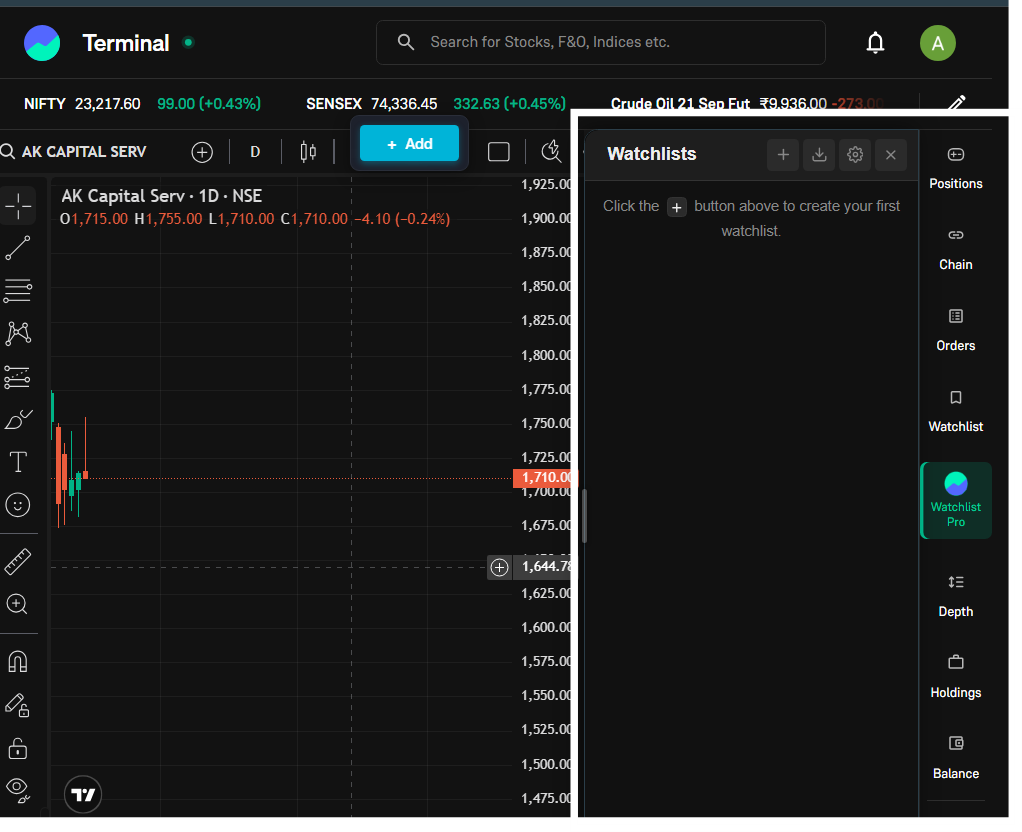
Trading on Groww: Default vs With Watchlist Pro
Groww has great charts, but managing setups across dozens of scans shouldn't slow down your execution.
Slow, capped & mouse-heavy
- Hard 30-stock limit per watchlist
- Must manually click each stock to load its chart
- Manually typing 50 tickers from Chartink screeners one-by-one
- Typing NIFTY or BANKNIFTY fails or opens equity search
- No color tags or quick setup notes
- No bulk CSV import or 1-click JSON backup
Unlimited speed right beside your chart
- Unlimited custom watchlists with 1,800+ stocks each
- 4-way arrow keys: cycle stocks (↓/↑) & watchlists (→/←)
- 1-click Chartink auto-sync with live re-sync button
- 60+ Indian index aliases auto-routed to /charts/indices/
- 6 color tags and custom stock notes for trade setups
- 1-click JSON backup & bulk CSV file import/export
You've probably already asked yourself…
- Why does Groww cap my custom watchlists when I track 100+ breakout stocks?
- Why do I have to switch back and forth between Chartink screener tabs and Groww?
- How can I quickly flip through 50 charts in 30 seconds using keyboard arrows?
- Why doesn't searching NIFTY or BANKNIFTY take me straight to the official index chart?
- How do I backup all my curated trading watchlists before switching computers?
- Can I tag stocks with colors and custom notes without paying for expensive tools?
Groww Watchlist Pro solves every single one of these — with zero monthly fees.
01 Install → 02 Dock → 03 Trade
A 10-second setup that permanently upgrades how you trade on Groww.
Install & Pin
Add the extension from the Chrome Web Store in one click. Pin the puzzle piece icon to your browser toolbar for easy access.
Dock into Groww
Open any chart on groww.in/charts or groww.in/terminal. The side panel automatically docks alongside your candlestick chart.
Trade at Keyboard Speed
Press ↓ or Space to cycle stocks, → to switch watchlists, and import complete Chartink scans in 1 click.
Engineered specifically for active Groww traders
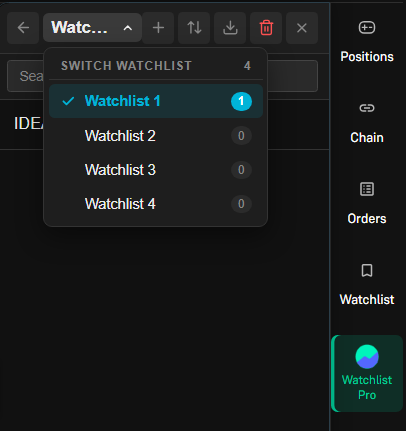
Watchlist Quick-Switcher
Click the watchlist title at the top of your sidepanel to reveal a fast searchable dropdown. Switch between 20+ watchlists in a single keystroke without navigating back.
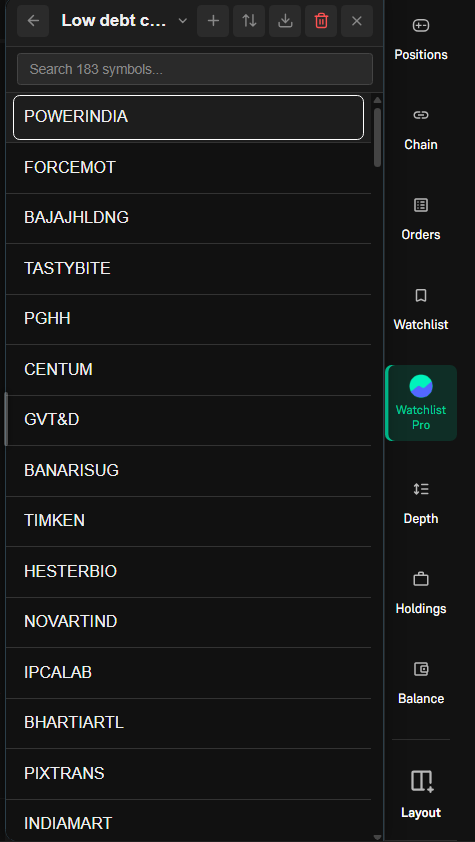
Arrow Key Chart Cycling
Press ↓ to load the next stock, ↑ for previous, and → / ← to cycle watchlists right from the chart without touching the mouse.
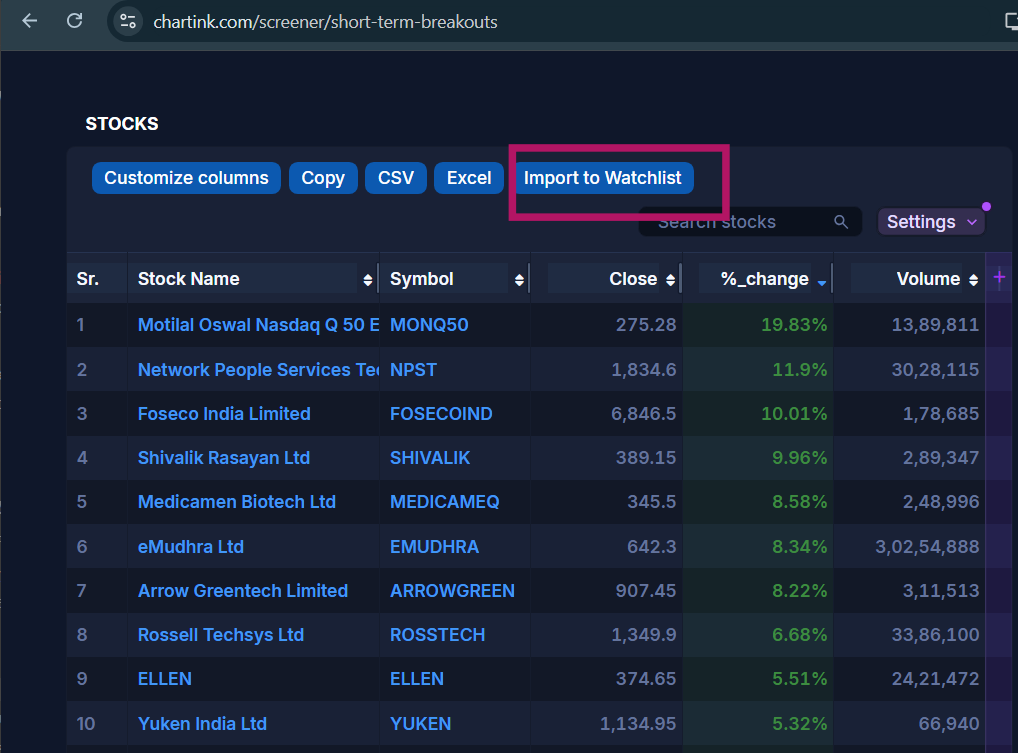
1-Click Screener Import & Re-Sync
Injects an 'Import to Watchlist' button on all Chartink.com screener pages. Automatically captures multi-page scan results and remembers the source URL with a 1-click Re-Sync button.
60+ Index Aliases Auto-Routing
Groww hosts index charts on /charts/indices/... rather than equities. Our engine maps NIFTY 50, BANKNIFTY, FINNIFTY, NIFTY IT, and 60+ others directly to official index charts.
Trade at keyboard speed
Try the live interactive simulator below to experience hands-on keyboard cycling.
All Supported Keyboard Shortcuts
| Key Shortcut | Context | Action Performed |
|---|---|---|
| ↓ | Inside Stock View | Select and highlight the next stock in current watchlist |
| ↑ | Inside Stock View | Select and highlight the previous stock in current watchlist |
| → (Arrow Right) | Inside Stock View | Quickly jump to the next watchlist |
| ← (Arrow Left) | Inside Stock View | Quickly jump to the previous watchlist |
| Enter | Inside Stock View | Open the currently highlighted stock on the Groww Chart |
| ↓ / ↑ / → / ← | Watchlists Overview | Navigate through the list of all created watchlists |
| Enter | Watchlists Overview | Open the selected watchlist to view its stocks |
| Esc | Any View | Close Quick-Switcher dropdown menu, modal, or context menu |
Answers to common questions
Is Groww Watchlist Pro completely free?
Yes — 100% free forever. There are zero paid subscriptions, zero premium tiers, zero ads, and no registration required.
Where is my watchlist data stored?
100% locally on your computer inside Chrome's secure local storage (chrome.storage.local). Nothing is ever sent to any third-party server or cloud.
How does the 1-click Chartink import work?
The extension injects a clean 'Import to Watchlist' button on Chartink screener pages. Clicking it extracts all scan results across all pagination pages and saves them into a dedicated Groww watchlist.
How does the Chartink Re-Sync button work?
Every watchlist imported from Chartink remembers the scan URL. Simply click the circular 'Re-sync' icon beside the watchlist name to re-fetch today's fresh scan results without opening Chartink.
Does it work with both Groww Charts and Groww Terminal?
Yes! The extension docks smoothly into both groww.in/charts/* and groww.in/terminal, ensuring your watchlists are always by your side.
Is this extension affiliated with Groww or Chartink?
No. Groww Watchlist Pro is an independent companion tool developed by Alen Sarang Satheesh. It is not affiliated with, endorsed by, or sponsored by Groww or Chartink.
Support Development & Custom Work
Groww Watchlist Pro is 100% free, private, and runs entirely in your browser without tracking. If this tool saves you time, consider buying me a coffee to support maintenance and updates. I am also available for freelance web applications, custom software, plugins, and browser extension development projects.
Supercharge your Groww charts today.
Install Groww Watchlist Pro and enjoy unlimited watchlists, instant keyboard cycling, and automated Chartink screener imports.